Проектиране на канализационни инсталации: Разлика между версии
Редакция без резюме |
|||
| Ред 21: | Ред 21: | ||
This article presents the basic design path for the internal gravity sanitary sewerage system between the sanitary fixtures and the building outlet. | This article presents the basic design path for the internal gravity sanitary sewerage system between the sanitary fixtures and the building outlet. | ||
== | ==Модули и програмна конфигурация== | ||
* '''InstalSystem 5''' | * '''InstalSystem 5''' с включен модул: | ||
**'''<IS_TS id=PH_IS5_S/>''' | **'''<IS_TS id=PH_IS5_S/>''' | ||
==Project file== | ==Project file== | ||
The project file used in this lesson: [[Gravity sewage instalation in multifamily building (example for the lesson)]]. | The project file used in this lesson: [[Gravity sewage instalation in multifamily building (example for the lesson)]]. | ||
Версия от 14:42, 9 август 2022
| Продукт | InstalSystem 5 |
| Вид статия | Проектни уроци |
| Актуално съдържание за версия | 2022-06-06 |
Scope of lesson
This article presents the basic design path for the internal gravity sanitary sewerage system between the sanitary fixtures and the building outlet.
Модули и програмна конфигурация
- InstalSystem 5 с включен модул:
- Канализационни системи
Project file
The project file used in this lesson: Gravity sewage instalation in multifamily building (example for the lesson).
Initial state
The project contains complete default data configured in the template file. The building structure has been elaborated on the basis of DWG layouts.
Steps to perform
Opening the project file
- When creating a new design, select from the list the template that contains the default data for the drainage system
- (or): upload an existing building structure file - minimum content is correct ordinates and slab thicknesses. If the design was created with a configuration that did not include the drainage system, import the drainage system general data from the appropriate template.
За повече информация, моля вижте: Template files
Editing the general project data
Enable Канализационни инсталации.
Verify data that affect significantly the geometry of the drainage system, unique to each project:
- default depth of the drainage outlet to the external network (relative to the design 'zero' level), taking also into account the ground level
- floor thickness specifications (layers placed on the floor slab) on individual storeys - ATTENTION! this may affect previously completed or planned designs of other systems in this file. Drainage fixtures are positioned on the floor or at a predetermined distance from the floor surface.
Further adjustment of the general data may be necessary when work is started on a file created without a drainage module and without a dedicated design template:
- In the Канализационни инсталации tab specify:
- Опции и стандарти на изчисление:
- In the Стандарт на изчисление tab select the one appropriate for the market region,
- Тип на сграда,
- specify mimimum gradients in accordance with design requirements and applicable regulations,
- Indicate the default direction for the Метод на провеждане на отклонения,
- For the selected direction define the default value of the Разстояние от пода на тръбни отклонения до вертикален клон - which will be applied on all storeys in the project, and which then can be individually modified on selected storeys,
- Default pipe-run fill ratio.
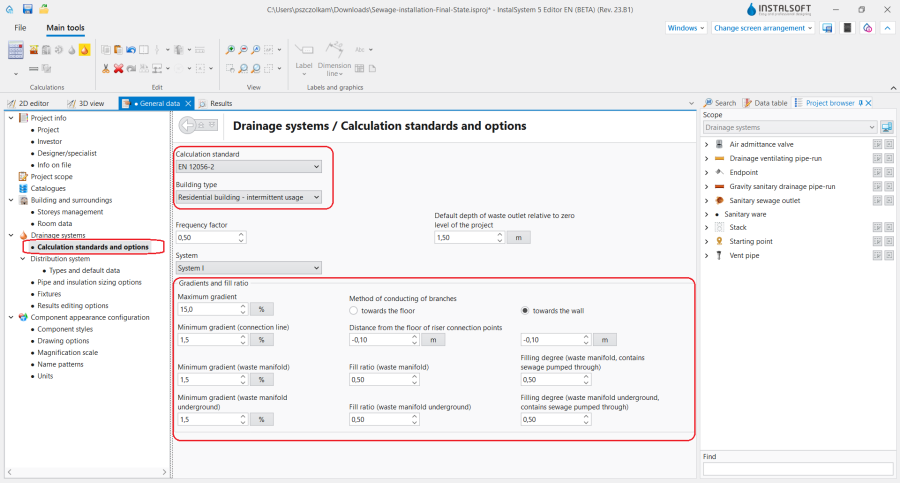
1.In the Опции и стандарти на изчисление tab specify Наклони и степен на напълване.
- Опции и стандарти на изчисление:

- In the Разпределителна система tab specify Видове и данни по подразбиране for each component with regard to,
- Вид на тръбна система по подразбиране: Канализация / Вентилиране на канализация for the various pipe-run locations,
- Начини на свързване по подразбиране - the picklists depend on the content of default pipe catalogues for the given location,
- Видове по подразбиране: Други елементи.

2.In the Видове и данни по подразбиране tab select Вид на тръбна система по подразбиране: Канализация / Вентилиране на канализация and change Видове по подразбиране: Други елементи.
- In the Прибори table assign data with regard to:
- Системни връзки по подразбиране - from the pipe folder specified for the connections select the appropriate system for the given fixture type,
- Система за свързване на други санитарни прибори - common selection for the remianing fixture types.
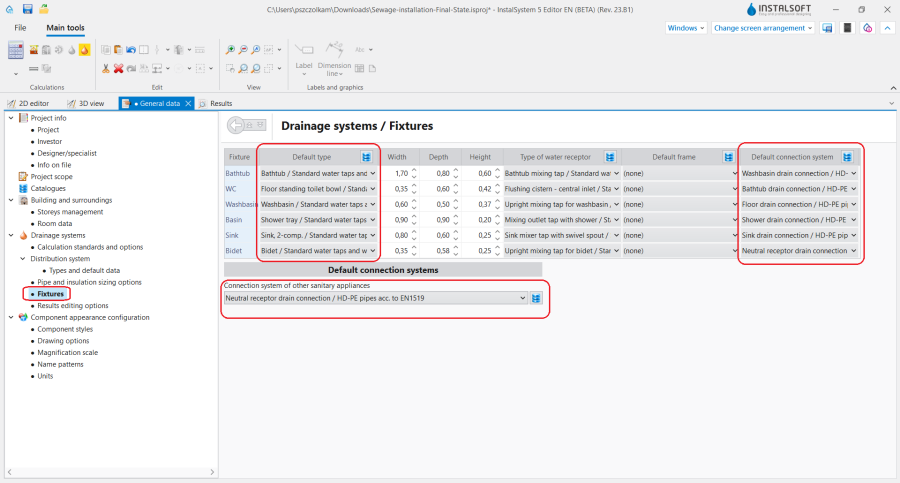
3.In the Прибори tab specify Стандартна вградена структура, Системни връзки по подразбиране, Система за свързване на други санитарни прибори.


- Editing data in the Управление на етажи project section
- For storeys with a drainage network, determine the required value of Точка на преминаване на вертикален клон към хоризонталения колектор, "Auto" means letting the program decide this depending on the location of the sewage outlet. By specifying a value manually, we can e.g. impose the location of the main sewer under the basement ceiling.
- Метод на провеждане на отклонения - change if on a given storey the value is different from that set out in the general data above,
- Разстояние от пода на тръбни отклонения до вертикален клон - negative values mean placing junctions on risers in plumbing shafts within a floor or ceiling slab, which may be necessary to maintain proper gradients from low-placed fixture outlets.
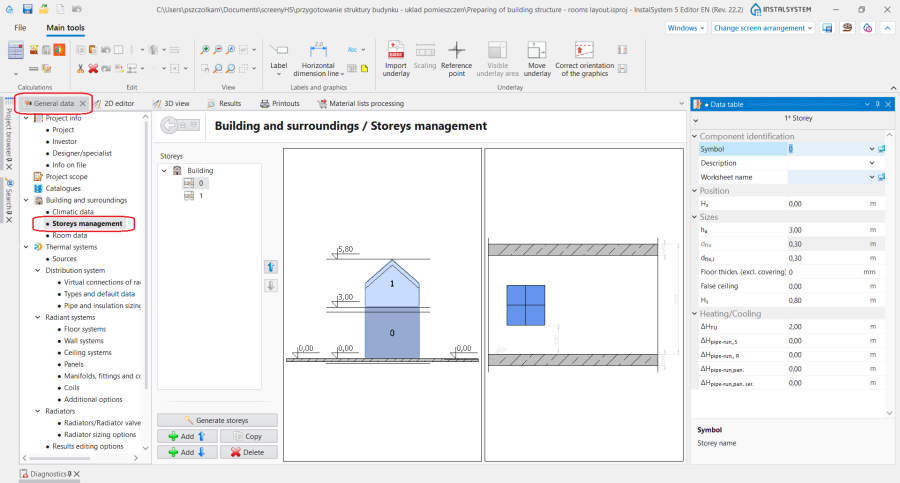
4.For each storey the Разстояние от пода на тръбни отклонения до вертикален клон can be modified.

Editing the installation and its data
Editing the installation structure
- Insert sanitary appliances, if these were not included in the file, e.g. from a previously completed design of water supply system За повече информация, моля вижте: Editing sanitary installation.
- Insert Вертикален канализационен клон elements and complete their essential data in the Таблица с данни window:
- Depending on the purpose of the Вертикален канализационен клон element, declare the proper type in the Видове участъци във вертикалния клон field.
- In the Елемент в горна част на вертикалния клон field, defie the way in which the pipe-run at the last storey for the Вертикален канализационен клон element finishes:
- For the waste stack, it is necessary to choose the vent element (e.g. Вентилационна тръба), leaving the Нито един option selected means that a vent manifold should be added in future,
- The vent Вертикален канализационен клон should be ended with a vent element, or it should be connected to the drainage stack.
- In the Положение section, declare the range of storeys of the element.
- Define additional parameters for double stacks (Битово-фекална канализация + Вентилиране на канализация): Разстояние м/у оси на тръби, Автоматично създаване на допълнителна вентилация checkbox selection.
- For theВертикален канализационен клон elements with bypass ventilation (with selected checkbox Автоматично създаване на допълнителна вентилация in the Таблица с данни element window), verify and, if needed, change the following parameters:
- Select the Създай междинни вентилационни връзки checkbox,
- Set the value in the Разстояние на междинна вент. връзка от тавана field,
- Change the value in the Кота долно свързване на вентилационен клон към канализационен клон field,
- (Optional) declare a number > 0 in the Брой на етажи с допълнителен вентилационен клон field (counting from the lowest storey).
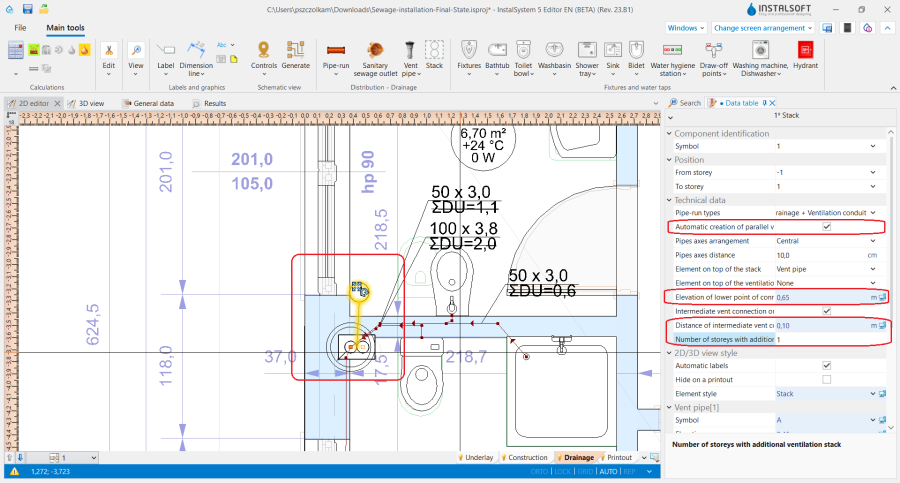
5. Автоматично създаване на допълнителна вентилация.
- Insert the Приемник на битови отпадъчни води and verify its position in the model,
- Connect the appliances with the Вертикален канализационен клон using the Участък components. ATTENTION! In the drainage system this component always consists of a single section. If, for perpendicular connections, other than 90-degree branch fittings are needed, they should be declared in the Общи данни window in the Видове и данни по подразбиране tab in the Начини на свързване по подразбиране section, and connections of Гравитационен битово-канализационен клон elements should be drawn as perpendicular (do not use "chamfering" in the plan view).
- On the storey where Приемник на битови отпадъчни води is placed, connect it with the Вертикален канализационен клон, to form the collector sewer. The collector sewer elevation is by default adjusted to the posion of the Приемник на битови отпадъчни води, unless the value of Точка на преминаване на вертикален клон към хоризонталения колектор has been specified manually.

Verifying the correctness of the installation structure.
- Verify the connectness of the connections of the installation components using the Провери връзки function (Shortcut: Shift + F2). ATTENTION! For some types of appliances where the approach direction should be perpendicular to the object (e.g. toilet with a tail outlet), this function automatically creates short pipe-runs immediately next to the appliance to ensure this perpendicularity.
- Verify the correctness of the installation structure and detect collisions with other systems using the 3D изглед, if necessary, enabling the view of other editing ranges, it is advisable to turn off the display of walls.
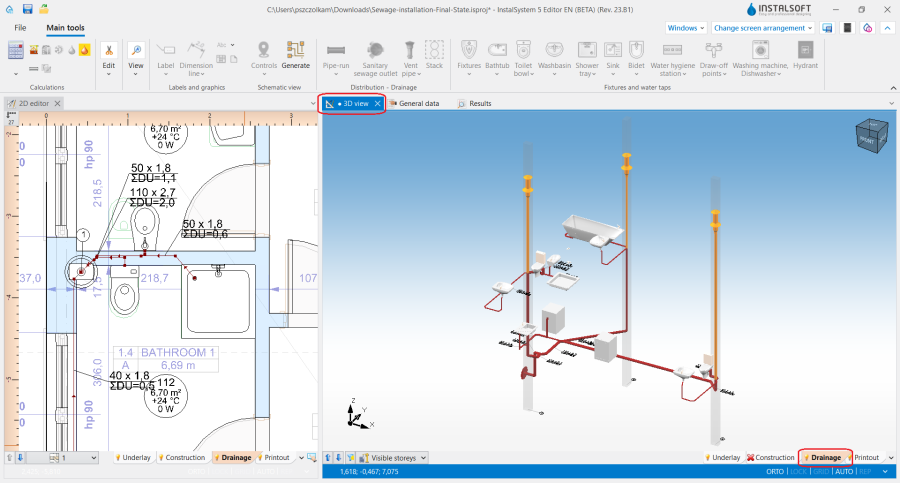
6. Verifying the correctness of the drainage installation structure using the 3D изглед. - Verify provisionally the vertical routing of pipe-runs in the model (calculations may alter this).
- Specify, if necessary: the elevations of the ends of the pipe-runs (paying attention to constraints resulting from their connection to other components), the actual gradients of pipe-runs.

ATTENTION! Following such changes, verification must be repeated.
Editing installation components data
- Verify and adjust the drainage-specific data of the appliances (DU, outlet diameter)
- If necessary, verify and adjust pipe-run data other than the default (pipe type, diameter setting, location)
- (Optional) If needed, change the way of realizing chosen pipe-run nodes into another than the default one. It is possible to change it in the Таблица с данни window for the краен възел element.
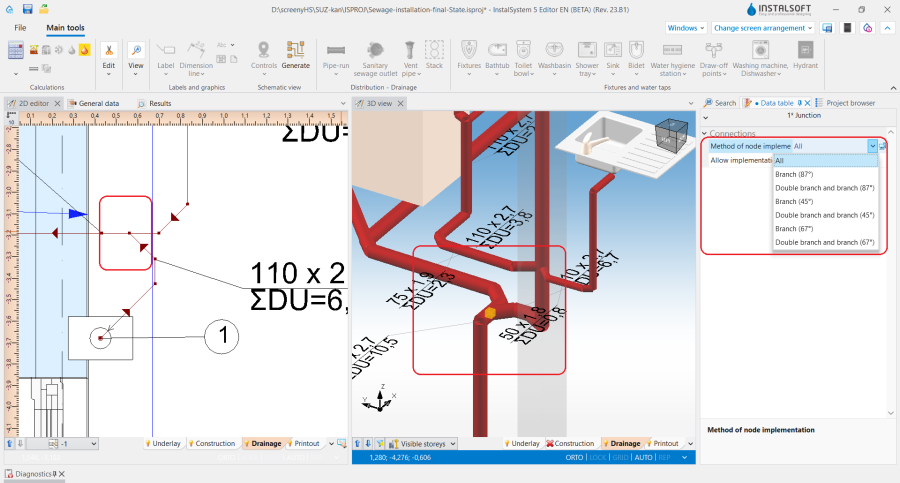
7. Change of pipe-run node realization.

Running the calculations
- If no errors are found during verification, start the calculation of the Канализационни инсталации by clicking
 in the Изчисления section of the toolbar. The calculations finally determine the vertical routing of the pipe-runs.
 - After the calculations, it is possible to correct manually the vertical passage of pipe-runs in the following way:
- imposing proper values in the Таблица с данни window for the Гравитационен битово-канализационен клон element in the following fields: Реален градиент, Кота на 1-ви възел, Кота на 2-ри възел.
- dividing the chosen elements of Гравитационен битово-канализационен клон in parts and properly modifying their data.
It is recommended to implement such changes gradually and to observe their influence upon the system, as the change in one node after calclations may have a significant impact on teh positioning of its greater part.
- Attention Defining the vertical passage of pipe-runs, the program does not exceed the value imposed in the Максимален градиент field in the Общи данни window in the Опции и стандарти на изчисление tab. This value is also automatically propagated to data of all the Гравитационен битово-канализационен клон elements. In case a difference of ordinates between the end of the calculated pipe-run and another pipe-run or a sewage outlet occurs, an additional vertical pipe-run is generated. An alternative solution of this issue is to allow posing pipe-runs with a greater gradient, by augmenting individually for each pipe-run a new value in the Максимален градиент field in the Общи данни window and by recalculating the project.

Verification of results
- After calculations, the system layout should be verified visually by means of the 3D изглед.
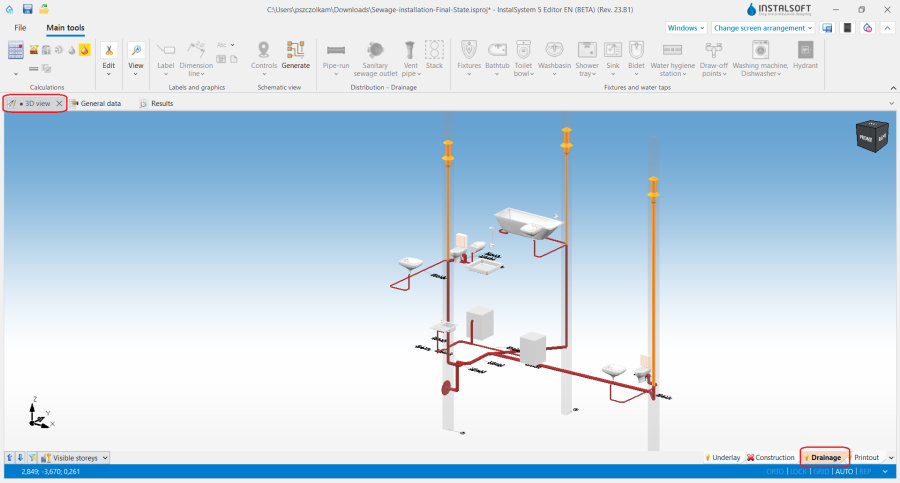
8. Visual verification of pipe routing using the 3D изглед function. - The dimensioned diameters of the pipe-runs and fittings can be verified directly in the drawings
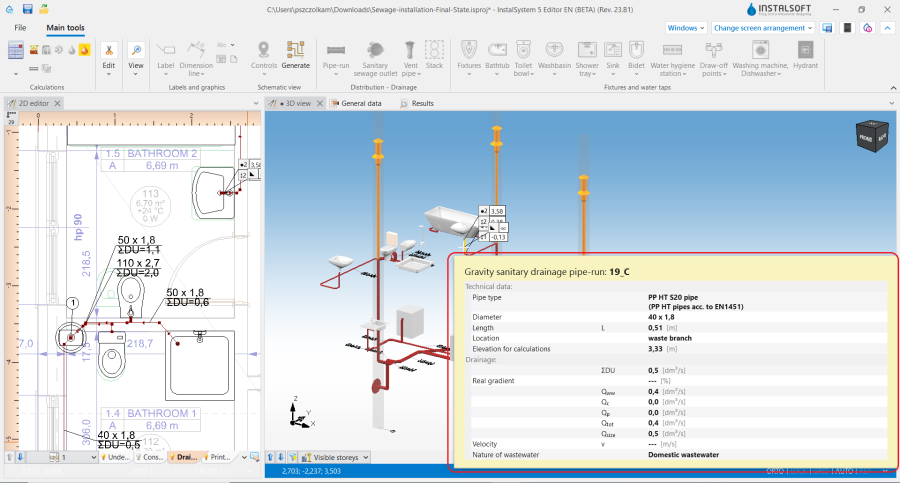
9. Verification of the dimensioned pipe-run diameters using the pipe-run properties window. - (Optional) If a catalogue with visualisation of fittings in nodes is used in the project, it can be used in order to assess correctness of fittings dimensioning for pipe-run nodes. To do so, node visualisation should be turned on in the Визуализация на канализационни фасонни части for На чертежа изглед в план and В 3D изглед in the Общи данни window in the Опции за чертане tab.
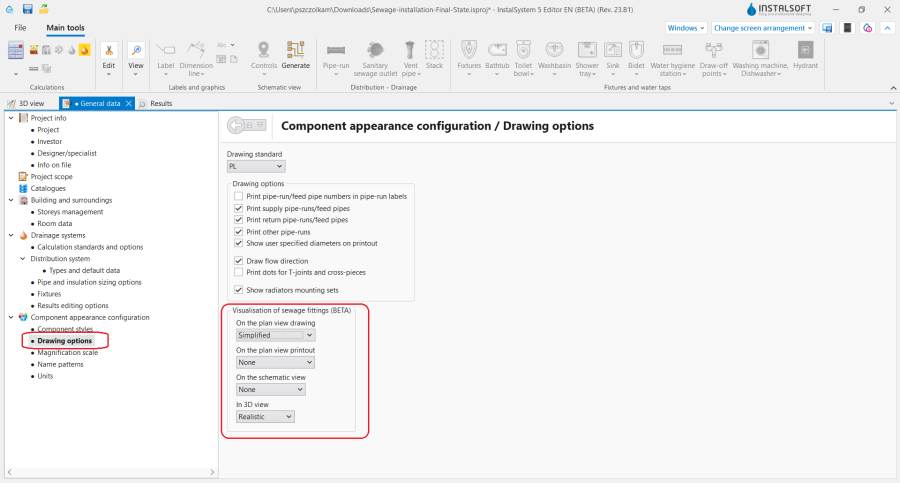
10. Ustawienia wizualizacji kształtek.
Attention! Only nodes with correctly chosen fittings, that is to say nodes without warning messages in the Диагностики window.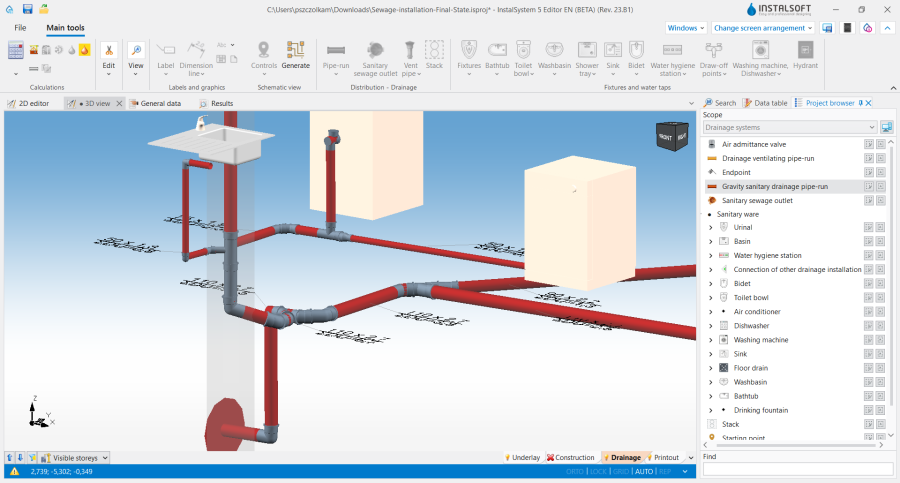
11. presentation of dimensioned fittings in the 3D изглед window. - Other forms of presentation of calculation results are component labels and tables of results За повече информация, моля вижте: Presentation of the calculations result
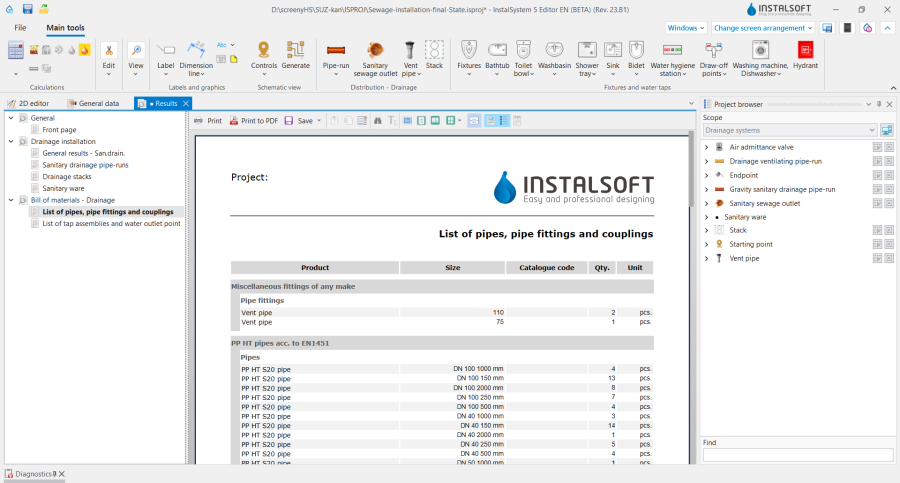
12. Количество на тръби, фитинги и муфи.


Generating schematic views
The schematic view will be generated automatically as described За повече информация, моля вижте: Automatically generate schematic views
Preparing drawings for export/printing
- To have the results for pipe-runs and installation nodes included in the printout, labels must be inserted За повече информация, моля вижте: Preparation of drawings for export / printing
- Completed drawings can be printed and/or exported За повече информация, моля вижте: Export / print results and drawings