Как да начертаете сграда с вътрешен двор?
Направо към навигацията
Направо към търсенето
| Продукт | InstalSystem 5 |
| Вид статия | СЪВЕТИ И ТРИКОВЕ |
| Актуално съдържание за версия | 2022-06-24 |
Problem description
In InstalSystem 5 there are several ways to design a building with a patio, allowing for optimal adaptation to the method of creating the building structure chosen in the project. Steps leading to create a building with a patio are described in detail further on in this article.
Solution
Using the Помещение and Контур на сграда components
Information on creating the building structure with the use of Помещение Ръчно and Контур на сграда components is provided in the article: Preparation of building structure - Rooms layout.
Method 1: using a closed C-shaped Помещение component
- Insert a closed C-shaped Помещение surrounding an interior patio in a building so that the edges of the room do not overlap.
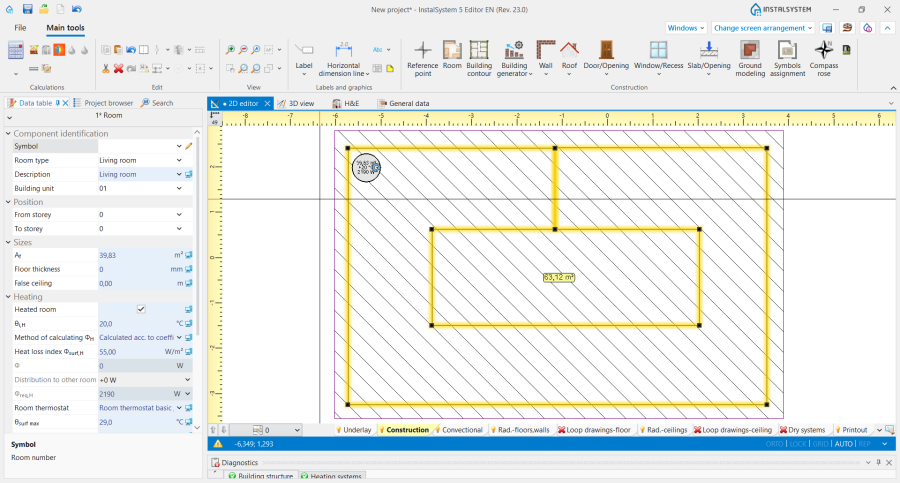
1. Closed C-shaped Помещение. - Add a Контур на сграда component to the design.
- In order to verify whether the edges of the Помещение do not overlap, launch Изчисление на сградна конструкция.
- Insert a Помещение Ръчно component to cover the area of the patio in the building.
- Launch Автоматични стени, плочи и покриви.
- Remove the Стена component left over after the manual C-shaped room.
- Over the patio area cut out an Отвор в покрива and connect it using any two edges with the outer edge of the Покрив.
- Optionally cut out an Отвор в плоча that covers the patio area.
- Run Изчисление на сградна конструкция again.

Method 2: outline the patio using manually placed walls
- Insert a Помещение.
- Add a Контур на сграда component to the design.
- Launch Автоматични стени, плочи и покриви.
- Launch Изчисление на сградна конструкция.
- Using the Стена components, draw the patio into the existing Помещение and launch Изчисление на сградна конструкция again.
- Over the patio area cut out an Отвор в покрива and connect it using any two edges with the outer edge of the Покрив.
- Optionally cut out an Отвор в плоча that covers the patio area.
- Run Изчисление на сградна конструкция again.
Using manually drawn walls
Information on creating a building structure using the Стена, Покрив and Плоча components is provided in the article: Preparation of building structure - Complete building structure.
- Outline the shape of the room and patio using the Стена components.
- Add Покрив and Плоча components to the design.
- Launch Изчисление на сградна конструкция.
- Over the patio area cut out an Отвор в покрива and connect it using any two edges with the outer edge of the Покрив.
- Optionally cut out an Отвор в плоча that covers the patio area.
- Run Изчисление на сградна конструкция again.
- Attention! It is also possible to leave an empty space above the patio and draw a Покрив in the form of two perfectly abutting roof slopes.
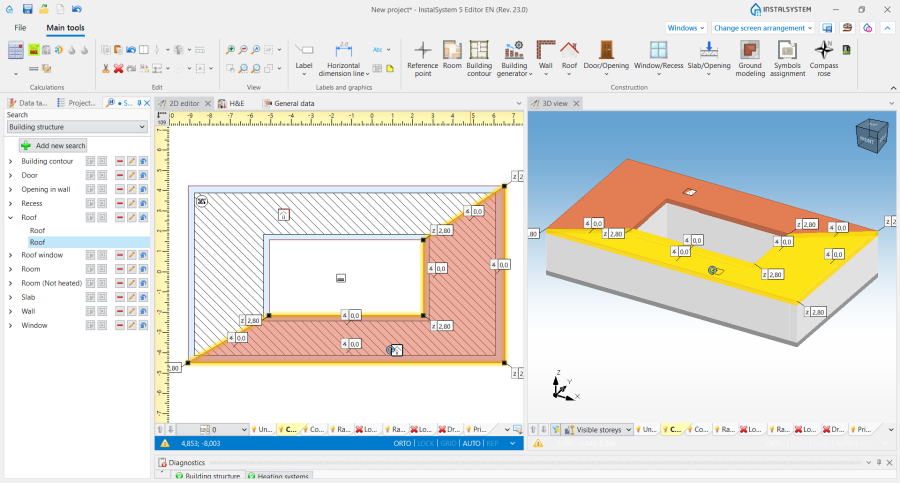
2. Roof slopes in a building with a patio.
