BIM – изнасяне на модела на инсталация и сграда на проекта към IFC модели
| Продукт | InstalSystem 5 |
| Вид статия | ФУНКЦИОНАЛНОСТИ |
| Актуално съдържание за версия | 2022-04-19 |
Описание
The BIM export from the InstalSystem 5 package is based on the IFC4 format and the exported model can be further edited by external software such as Allplan, ArchiCad, BricsCAD, DDS-CAD, Revit and others. The export is based on the 3D model and follows the IFC Reference View export method defined by buildingSMART.
InstalSystem 5 allows the export of various IFC4 class objects within the scopes: Отоплителни системи, Охладителни системи, Водоснабдителни инсталации and building structure. The export of IFC models can be done iteratively according to the BIM process. No file recalculation is required to obtain the IFC model (component data may be incomplete). This approach makes it possible to expedite the design process on large models, to focus on a selected part of it, and to process smaller files more efficiently between participants in the BIM process and to share data quickly for a specific stage of work.
During the export operation, the user can indicate which components of the project are to be exported and how many resulting IFC models are to be created.
Webinars
We encourage you to watch the video from our webinars presenting the possibilities of using the function described in this article:
Местоположение в програмата
- The Износ на IFC файл icon is available in the 2D редактор and 3D изглед windows on the Главни ленти с инструменти bar in the Печат и износ section when the Печат editing scope is enabled.
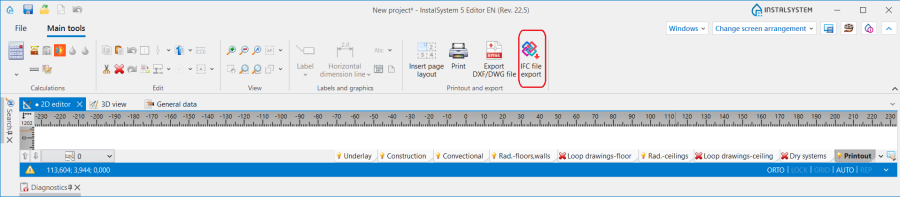
1. Износ на IFC файл

Examples of use
Export of an IFC file
In the Износ на IFC файл window, it is possible to enable or disable export of component labels, to specify precisely the range of components to be exported, to specify basic data about the exported IFC model(s), to select the sheets to be exported, and to specify the number of resulting IFC files.
Износ на IFC файл, depending on the project needs, can be performed at any stage of the design work, it is not necessary to calculate the file beforehand. When the operation is launched, a window appears in which the most important parameters for the operation must be set:
- Работен лист - in the list, all available worksheets (storeys) in the design are presented, which can be freely selected or deselected depending on demand and the respective design stage in the BIM process.
- Изходящ файл – in the list, the number, name and location of the file saved in IFC4 format are presented. The arrows can be used to create further result files. One worksheet can constitute one result file or belong to a file containing multiple worksheets.
- Запиши в програмни настройки - checking this will cause the last settings in the Износ на IFC файл window to be recalled the next time it is opened.
Export of labels to an IFC file
- Checking the Износ на етикети към IFC файл box causes installation/construction component labels to be exported together with the IFC4 model as ifcAnnotation graphic components. This is a way of supplementing the IFC model with additional information in the form of labels and the information contained therein. Labels, if required, can be assigned to any component, which can be removed, modified or hidden by another participant in the BIM process using other software. If the content and number of labels is large, the ifcAnnotation components can significantly increase the size of the IFC4 file and its export time.
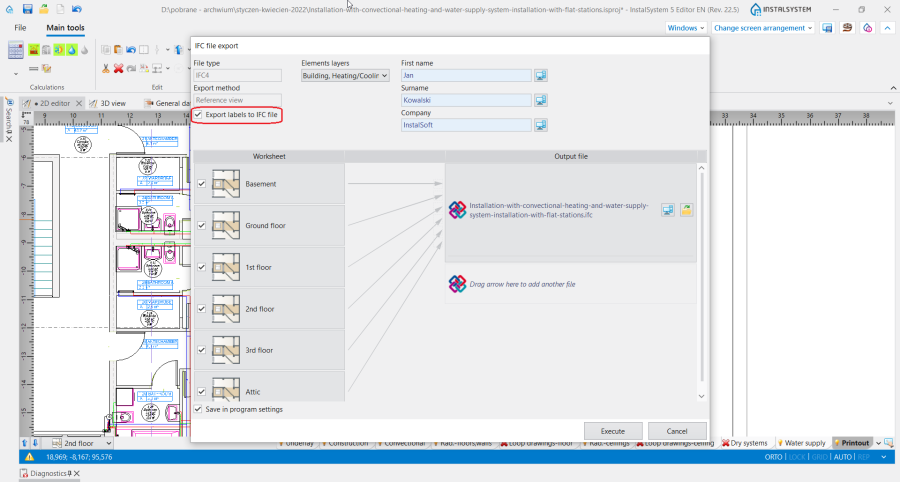
2. Износ на етикети към IFC файл

Selecting component layers for export
- InstalSystem 5 allows full control over the range of objects exported to the IFC4 format. In the Елементи на слоеве field list, the objects available for export are assigned to the corresponding scopes.
The mechanism for selecting objects/scopes identifies objects belonging to more than one scope (e.g. selecting the scope Водоснабдяване will select terminal units that belong to the scope Канализация even in the absence of a configuration that includes the scope Канализация). However, it is not possible to select components that are not part of the currently available licence configuration for export to IFC4 (except as described above).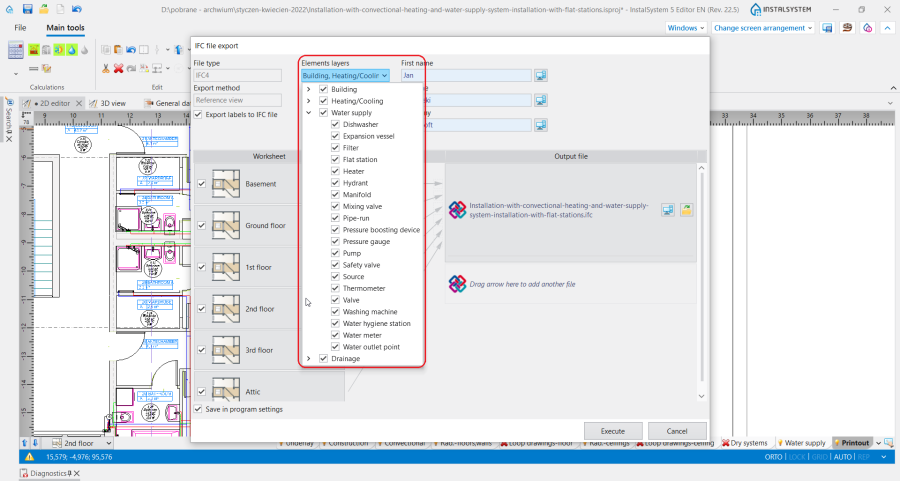
3. Selecting objects for export to an IFC model

Export of designer and company data
- Along with the selected objects, information from the fields Име and Юридическо лице (фирма) available in the Общи данни window in the Проектант section is automatically propagated during export. After changing the status icon to a pencil, the data to be exported can be changed or deleted. The information is placed in the IfcPerson and IfcOrganization fields respectively.
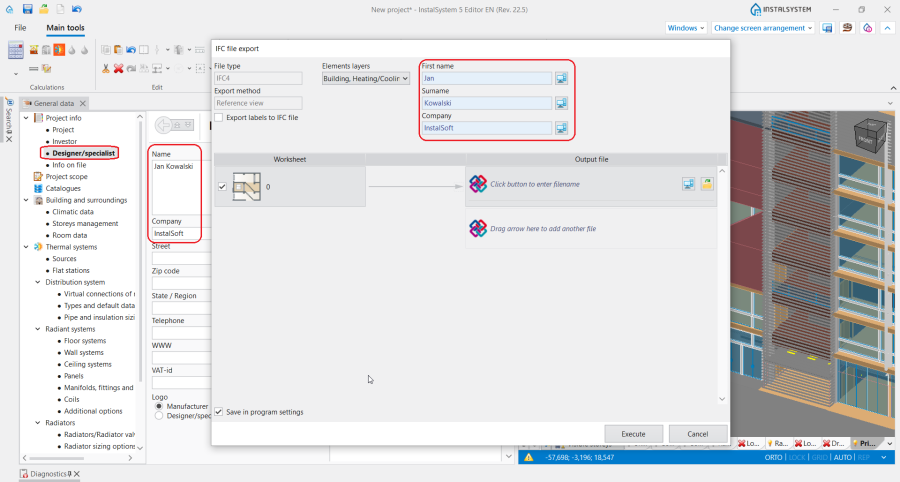
4. Проектант in the Износ на IFC файл window

Parameters of components exported to an IFC model
All components exported from InstalSystem 5 have the following parameters complete in addition to their geometric representation (identical to the 3D model):
- Unique GUID identifier,
- ifcEntity - presenting the name of the component properly identified by other software, in accordance with the BuildingSmart definition (e.g. ifcPipeSegment in exported IFC file represents the component Участък),
- Name field - containing the name of the component used in InstalSystem 5 together with the value in the Символ field (e.g. Двойно-апартаментен колектор: 1),
- Description field - containing a detailed description of the component to uniquely identify the component (e.g. the component has a description: : PV11_300 1600 mm (NEUTRAL RADIATORS); Размер: 300×1600×60),
- Components: Сграда, Помещение, Участък, Вертикален клон, Тръбна серпентина, Loop, Двойно-апартаментен колектор, Вентил (within the scopes: Отоплителни системи, Охладителни системи, Водоснабдителни инсталации) are exported along with the catalogue (part) number of the component, if such catalogue (part) code is included.
- All components are exported along with the catalogue (part) number of the component, if such catalogue (part) code is included.
As InstalSystem 5 software develops, more parameters are planned to be made available for export with the components.
Additional information
Components excluded from export
Excluded from the possibility of exporting to an IFC file are InstalSystem 5 components that are not visualised in the 3D model, i.e.:
- Изолация - pipe insulation shells, manifold insulation shells, pump group insulation shells, fitting insulation shells.
- Тръбни фитинги - within the scopes: Отоплителни системи, Охладителни системи, Водоснабдителни инсталации.
Note: Fittings within the Канализационни инсталации scope are exported only when in the Общи данни window, Опции за чертане section, Визуализация на канализационни фасонни части В 3D изглед field the Реалистично option is checked.
Further processing of models exported from InstalSystem 5
Models generated in the InstalSystem 5 package can participate in data exchange through various types of platforms used to exchange data and information between participants in CDE (common data environment) type design processes. Models can be analysed and processed using third-party software, for example for the following purposes:
- Conflict detection for the identification and reporting of errors in the BIM model,
- Combining multiple files into one model,
- Viewing and grouping of component data in the IFC model,
- Support for the creation of an axonometric projection from an IFC model, further export of the IFC model to dwg3D format (e.g. using BricsCAD software),
- Adding (to improve the quality of information flow) BCF comments that are linked to the IFC model,
- Adding or deleting individual components or groups of components,
- Converting the model into native components (e.g. Revit software after using the free Open BIM collaboration plug-in allows pipes exported from InstalSystem 5 to be converted into native Revit components (default pipe), so that selected pipe families can be assigned to these components and fittings and insulation can be added to the model.