Проектиране на отоплителни системи с конвекторни радиатори: Разлика между версии
| Ред 48: | Ред 48: | ||
#* ''<IS_TS id=DomSysPodlGrzejnika/>'', | #* ''<IS_TS id=DomSysPodlGrzejnika/>'', | ||
#* ''<IS_TS id=DomyslnaArmaturaGrzejDolZas/>'' - отбелязва правилното приложение: за еднотръбна или двутръбна система, | #* ''<IS_TS id=DomyslnaArmaturaGrzejDolZas/>'' - отбелязва правилното приложение: за еднотръбна или двутръбна система, | ||
#* ''<IS_TS id=DomyslnyZestGrzej/>'' - | #* ''<IS_TS id=DomyslnyZestGrzej/>'' - отбелязва правилното приложение: за еднотръбна или двутръбна система.<br/>[[File:Heating-systems-Radiator-type.PNG|900 px|left|thumb|1. ''<IS_TS id=GrzejnikiTypyIDane/>'']]<br clear="all"/> | ||
#. Раздел ''<IS_TS id=InstalacjeCieplne/>''/''<IS_TS id=iNameCOGrzejnikPlural/>''/''<IS_TS id=sOpcjeDoboruGrzejnikow/>'' – проверява и добавя основни параметри: | #. Раздел ''<IS_TS id=InstalacjeCieplne/>''/''<IS_TS id=iNameCOGrzejnikPlural/>''/''<IS_TS id=sOpcjeDoboruGrzejnikow/>'' – проверява и добавя основни параметри: | ||
#* ''<IS_TS id=strBtnDefWymMaxCaption/>'' (''<IS_TS id=DomyslnaMetodaDoboruGrzejnika/>''), | #* ''<IS_TS id=strBtnDefWymMaxCaption/>'' (''<IS_TS id=DomyslnaMetodaDoboruGrzejnika/>''), | ||
Версия от 09:05, 18 ноември 2017
| Продукт | InstalSystem 5 |
| Вид статия | DESIGN APPLICATION |
| Актуално съдържание за версия | IS 5.0 Beta Rev. 0.0.B35 |
ОБХВАТ НА УРОК
Статията представя метода за проектиране на отоплителна система с конвекторни радиатори от източника до топлинни единици, включително пълно управление и балансиране.
МОДУЛИ И ПРОГРАМНА КОНФИГУРАЦИЯ
- Пакетът InstalSystem 5 съдържа модула:
- Едно- и двутръбни отоплителни системи с конвекторни нагреватели
Начално състояние
Проектът, който включва конструкцията на сградата (етажи, помещения). Стойностите на проектния топлинен товар на помещенията са определени за отопление.
СТЪПКИ НА ИЗПЪЛНЕНИЕ
Зареждане на каталози и задаване на стандартни данни за проекта
- Раздел Изчислителни раздели (модули) - определя проектния обхват: Отоплителни системи.
- Раздел Управление на етажи – проверява и добавя основни параметри:
- Разстояние по подразбиране между подове и тръби за средно разпределение към радиаторната система (ΔHуч.).
- Разстоянието по подразбиране между прага и пода (hпп).
- Ширина по подразбиране на нишата - тази стойност оказва влияние върху дължината на радиаторите, разположени на различно място, от това под прозорците (Широчина на ниша).
- Раздел Каталози – зарежда каталози на продукти необходими за проекта.
- Раздел Термални системи/Източници – проверка на параметрите:
- Default supply temperature (θs,О).
- Раздел Термални системи/Разпределителна система/Видове и данни по подразбиране – добавя тръба по подразбиране и видове на изолация, проверка на други данни.
- Раздел Термални системи/Разпределителна система/Опции за оразмеряване на тръба и изолация – проверява параметрите за оразмеряване на тръбите и изолацията.
- Раздел Термални системи/Разпределителна система/ добавя видове по подразбиране:
- Видове вентили и арматури по подразбиране,
- ,
- Фасонни части и колектори по подразбиране,
- Verify Опции за хидравлично регулирано.
- Раздел Термални системи/Отоплителни тела/Отоплителни тела/Радиаторни вентили - типове и данни по подразбиране – добавя видове по подразбиране:
- Тип на отоплително тяло по подразбиране,
- Система за свързване на отоплително тяло по подразбиране,
- Вентили по подразбиране за отоплителни теля с подаване надолу - отбелязва правилното приложение: за еднотръбна или двутръбна система,
- Комплект радиаторни вентили по подразбиране - отбелязва правилното приложение: за еднотръбна или двутръбна система.
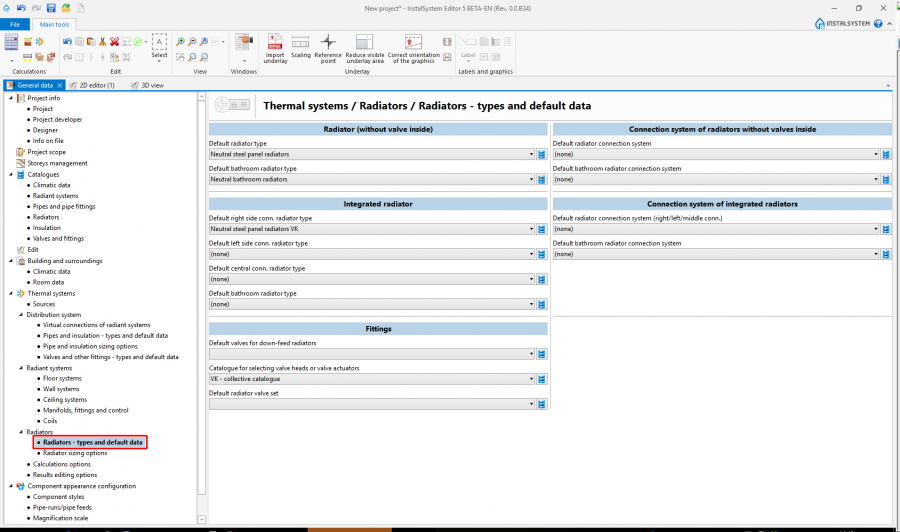
1. Отоплителни тела/Радиаторни вентили - типове и данни по подразбиране
- . Раздел Термални системи/Отоплителни тела/Опции за оразмеряване на отоплителни тела – проверява и добавя основни параметри:
- Условни ограничения в размера на отоплително тяло (Метод на оразмеряване по подразбиране),
- Опции за оразмеряване на отоплителни тела,
- Добавки към размера на отоплително тяло.
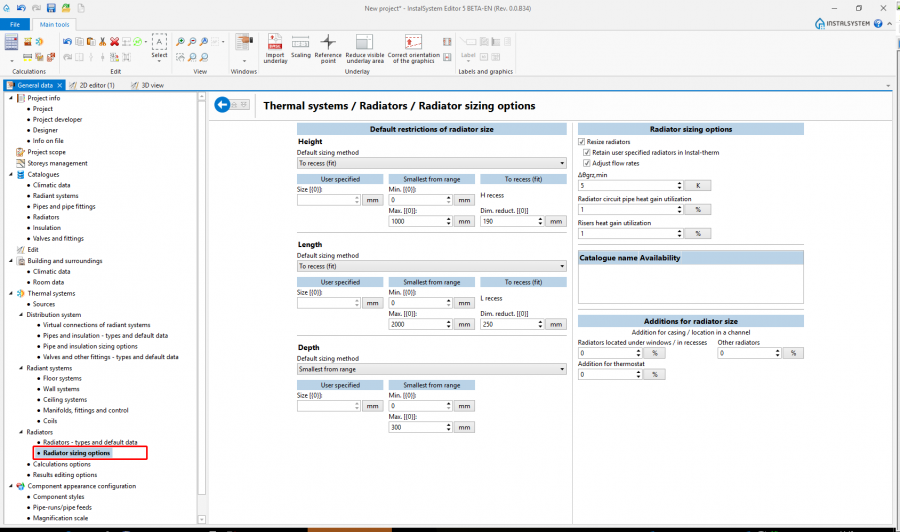
2. Опции за оразмеряване на отоплителни тела


| Project files
|
Initial state, isproj heating system with convective radiators, isproj |
| Designed with | InstalSystem 5 Rev. Beta 35 |
| Required modules | InstalSystem basis Heating systems |
| Project range | Heating with convective radiators |
| Used catalogues |
PEX/AL/PEX system (pipes and fittings) |
| Type of building | residential building without basement 1-storey |
| Building structure | |
| Drawings range | Plan drawings |
| Prepared by |  www.instalsoft.com |
| Legal disclaimer | Copy all or fragments allowed |
| Calculation results | Complete range of calculation results, xls Complete range of available printouts, pdf Heating calculation results, pdf Bill of materials, pdf |
| Drawing results | Ground floor, dwg Ground floor, pdf |
Editing the system - convector radiators
Inserting convector radiators and graphic editing
Carry out inserting and graphic editing operations using the АВТО mode, Flip horizontally, Избери multiple functions.
- Select editing scope Конвекция.
- Insert multiple radiators under the windows/into recesses. This operation requires the structure of the building to be created beforehand, including windows/recesses.
За повече информация, моля вижте: Preparation of building structure - Insert radiators manually at other locations.
Change of radiator installation height/depth
- Adjust the installation height of bathroom radiators (Разстояние от под (зададено в данни за етажа))/ installation depth of trench heaters (Разстояние от под (зададено в данни за етажа) - enter negative value equal to trench depth).
Inserting Радиаторни вентили
- Place components: Радиаторни вентили on selected radiators.
Editing Тип връзка
- Change Тип връзка of selected radiators using tools for marking multiple components.
Editing the system - append drawings with double-pipe medium distribution system
Генератор на топлина и студ
- Insert Генератор на топлина и студ.
Arranging the system
- Arrange the system starting from Генератор на топлина и студ in the separate parts of the building including all radiators without connecting them. Draw the system using the Pipe-run pair with adequate spacing between, using the АВТО and ОРТО modes.
Connecting radiators to the system
- Connect the radiators to the distribution system using the Автоматично присъедини прибори function and tools for marking multiple components, and, if necessary, using the Pipe-run pair and the АВТО and ОРТО modes.
Fittings
- Insert Вентил on feed and return branches of non-integrated radiators. Note whether valves on the branches adhere to radiators and the shape of valves (straight/angle). The shape of valves has an impact on proper selection of radiator connections.
- Adjust valve orientation where default orientation is incorrect.
Editing the system - appending drawings with single-pipe medium distribution system
Connecting radiators in series
- Make connections between radiators using the Серийна връзка.
System arrangement
- Arrange the system starting from Генератор на топлина и студ to the separate parts of the building including all radiators without connecting them. Draw the system using the combination of Pipe-run pair and Участък components, and using the АВТО and ОРТО modes.
- Connect the first and last radiator in a series using Участък.
Verification of the correctness of building structure
- Verify the correctness of system structure using the Провери връзки function (key shortcut: Shift + F2).
- Verify the correctness of system structure and find conflicts using 3D изглед.
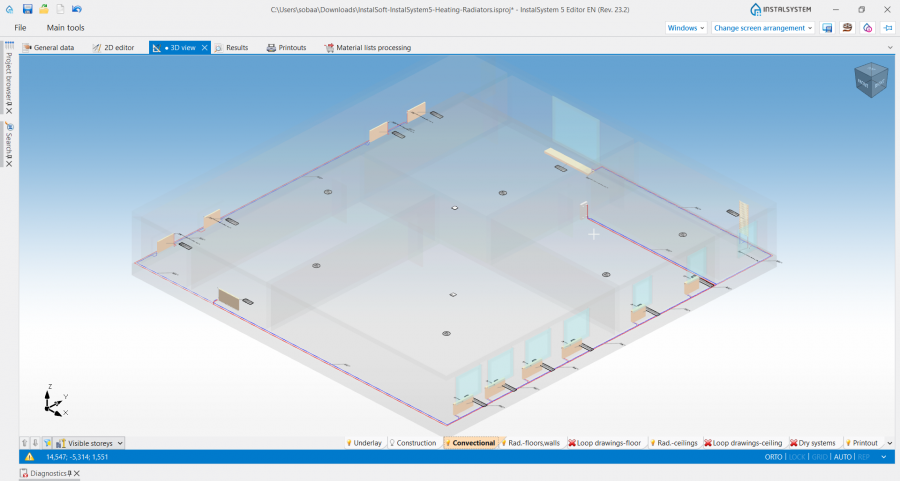
3. 3D изглед

За повече информация, моля вижте: Verification of the correctness of building structure
Editing system component data
Отоплителни тела
- Adjust contribution of radiators in heat load coverage in rooms (Разпределение[%]).
- Specify additions due to radiator location other than under window.
- Change radiator sizing method or default limitations of: Височина, Дължина or Дълбочина.
- Change radiator type for radiators other than default. When necessary, select specific radiator from catalogue.
Fittings
- Verify data of valves/fittings inserted on the radiators or in the system.
Calculations and diagnostics
- Launch complete calculations by clicking the calculator icon
 in section Изчисления of the toolbar.
 - Verify calculation results paying special attention to:
- heat demand coverage in rooms,
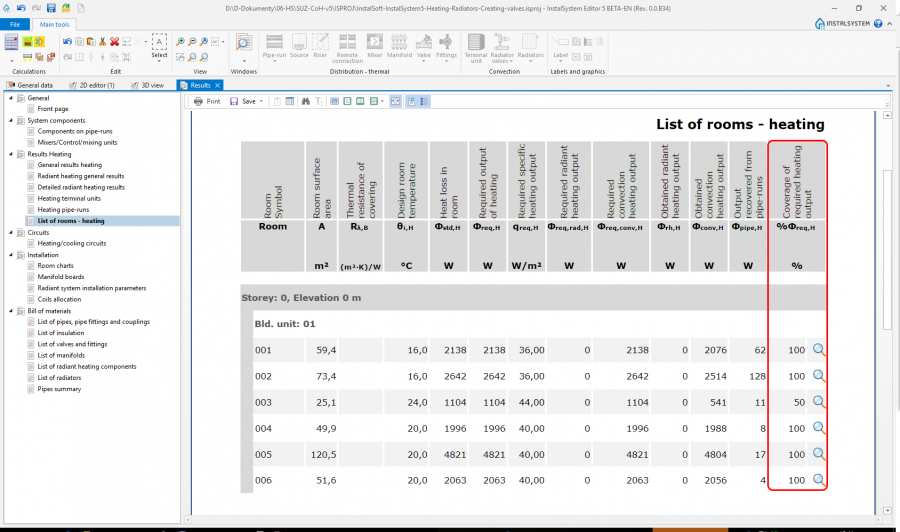
4. Количество на помещения - отопление - size of radiators,
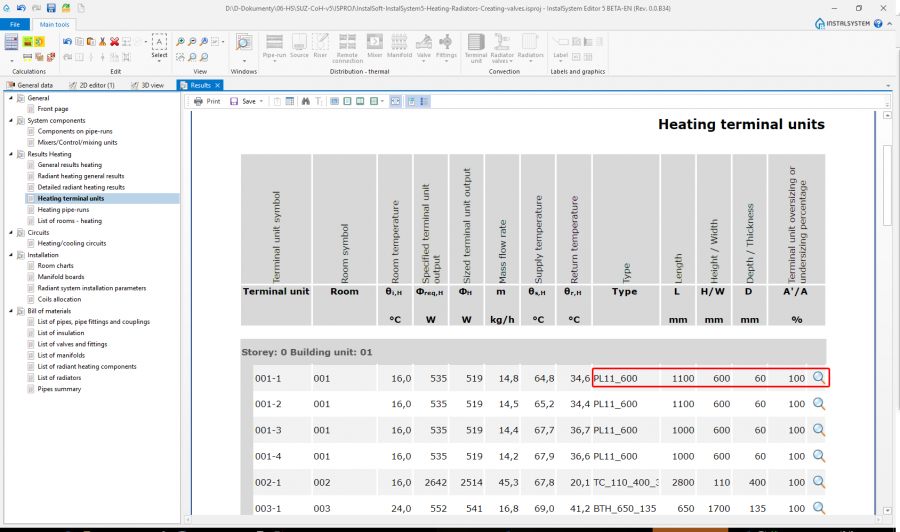
5. Отоплителни терминални прибори - selection of radiator connections,
- messages about unbalanced flow in circuits.
- heat demand coverage in rooms,


За повече информация, моля вижте: Calculations and diagnostics
Preparing drawings for printing/exporting
За повече информация, моля вижте: Preparation of drawings for export/printing