Търсене на елементи в проекта: Разлика между версии
Направо към навигацията
Направо към търсенето
Pszczolkam (беседа | приноси) (powiązanie HC case 133023) |
Редакция без резюме |
||
| Ред 44: | Ред 44: | ||
[[Category:InstalSystem 5]] | [[Category:InstalSystem 5]] | ||
[[Category:FUNCTION AND TOOL]] | [[Category:FUNCTION AND TOOL]] | ||
<!-- Do not write text below this tag --> | |||
<br class="iwlinks"/>[[pl:Wyszukiwanie elementów w projekcie|Wyszukiwanie elementów w projekcie]][[en:Search components in the project|Search components in the project]][[bs:Search components in the project|Search components in the project]][[zh-cn:在项目中查找部件|在项目中查找部件]][[cs:Search components in the project|Search components in the project]][[da:Search components in the project|Search components in the project]][[et:Search components in the project|Search components in the project]][[es:Search components in the project|Search components in the project]][[fi:Search components in the project|Search components in the project]][[fr:Search components in the project|Search components in the project]][[hr:Search components in the project|Search components in the project]][[hu:Search components in the project|Search components in the project]][[fa:Search components in the project|Search components in the project]][[it:Ricerca degli elementi nel progetto|Ricerca degli elementi nel progetto]][[lt:Elementų paieška projekte|Elementų paieška projekte]][[lv:Search components in the project|Search components in the project]][[nl:Search components in the project|Search components in the project]][[nb:Search components in the project|Search components in the project]][[sv:Search components in the project|Search components in the project]][[sl:Search components in the project|Search components in the project]][[sk:Search components in the project|Search components in the project]][[tr:Search components in the project|Search components in the project]][[sr-el:Search components in the project|Search components in the project]] | |||
Версия от 20:26, 4 февруари 2022
| Продукт | InstalSystem 5 |
| Вид статия | ФУНКЦИОНАЛНОСТИ |
| Актуално съдържание за версия | IS 5.0 Beta 22 |
Описание
Инструментът позволява търсене на елемент или група елементи в рамките на проекта. В резултат намерените елементи са маркирани във всички активни прозорци, като например: 2D редактор, 3D изглед, Таблица с данни, Резултати и т.н.
Местоположение в програма
- Функцията представлява отделен прозорец и е достъпен в лента Главни ленти с инструменти на секция Прозорци.
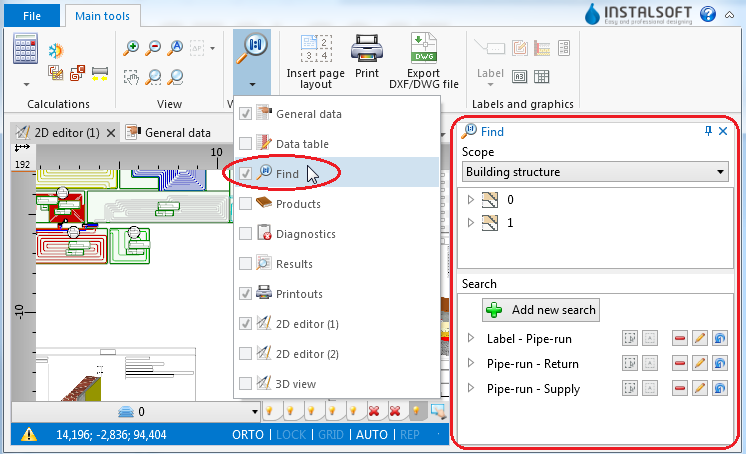
1. function

ПРИМЕР ЗА ИЗПОЛЗВАНЕ
Търсене на елементи от избрания вид
- Изберете Раздел на търсене (например Сградна конструкция, Отоплителна и охладителна инсталация).
- Изберете елемента от дървото на елементите.
- Допълнителни бутони от дясната страна на прозореца позволяват:
- търсене на компоненти от избран тип в чертеж, указан от потребителя,
- търсене на всички елементи от избрания вид.
Търсенето на елементи, които отговарят на определени критерии
- Изберете едно от предварително дефинираните търсения
или - Изберете Добави ново търсене.
- Попълнете полето Търси по име.
- Изберете обхвата на търсенето в полето Намери.
- Изберете от списъка типа данни, който ще се използват при търсенето.
- Намалете обхвата на търсенето си, като зададете стойностите на избраните данни.