Избор и редакция на множество елементи: Разлика между версии
Направо към навигацията
Направо към търсенето
(Нова страница: „<!--Case 150708, W9674--> <IS_HELP id="HS95"/> {{Article table |commercial_product1=InstalSystem 5 |p2 =<!--gdy jest kolejny produkt handlowy, zam...“) |
Редакция без резюме |
||
| Ред 7: | Ред 7: | ||
|p4 =<!--gdy jest kolejny produkt handlowy, zamienić na->"produkt_handlowy3="--> | |p4 =<!--gdy jest kolejny produkt handlowy, zamienić na->"produkt_handlowy3="--> | ||
|category1 =InstalSystem 5#Funkcjonalności | |category1 =InstalSystem 5#Funkcjonalności | ||
|category_name1 = | |category_name1 =ФУНКЦИОНАЛНОСТИ | ||
|c2 =<!--Jest kategoria -> zamienić na: "category2=" i uzupełnić link do sekcji kategorii na stronie głównej produktu--> | |c2 =<!--Jest kategoria -> zamienić na: "category2=" i uzupełnić link do sekcji kategorii na stronie głównej produktu--> | ||
|category_name2 =<!--podać nazwę kategorii "ZASTOSOWANIE"/"FUNCTIONALITY"/...--> | |category_name2 =<!--podać nazwę kategorii "ZASTOSOWANIE"/"FUNCTIONALITY"/...--> | ||
| Ред 59: | Ред 59: | ||
[[Category:InstalSystem 5]] | [[Category:InstalSystem 5]] | ||
[[Category: | [[Category:ФУНКЦИОНАЛНОСТИ]] | ||
<!-- Do not write text below this tag --> | <!-- Do not write text below this tag --> | ||
<br class="iwlinks"/>[[pl:Zaznaczanie i edycja wielu elementów jednocześnie|Zaznaczanie i edycja wielu elementów jednocześnie]] | <br class="iwlinks"/>[[pl:Zaznaczanie i edycja wielu elementów jednocześnie|Zaznaczanie i edycja wielu elementów jednocześnie]] | ||
Версия от 14:29, 10 август 2022
| Продукт | InstalSystem 5 |
| Вид статия | ФУНКЦИОНАЛНОСТИ |
| Актуално съдържание за версия | 2017-11-16 |
Description
In the InstalSystem software there is a possibility to select and edit multiple elements simultaneously.
Location in the program
Multiple elements can be selected with the use of various software tools, described below:
- Graphical editor (2D редактор and 3D изглед)
- Selecting multiple elements one-by-one
- - while holding Ctrl button, click on individual elements with the left mouse button
- Selecting multiple elements from given area
- - while holding left mouse button, drag the mouse cursor in order to specify selection area
- - perform a Избери елементи в правоъгълник operation, accessible:
- - in context menu, which is opened by clicking the righ mouse button anywhere in the graphical editor
- - on the Главни ленти с инструменти toolbar, section Редакция, after expanding Избери icon
- Selecting all elements located in the given graphical editor and belonging to the active edditing scopes
- - use the Ctrl+A buttons combination
- - perform a Избери всичко operation, accessible on the Главни ленти с инструменти toolbar, section Редакция, after expanding Избери icon
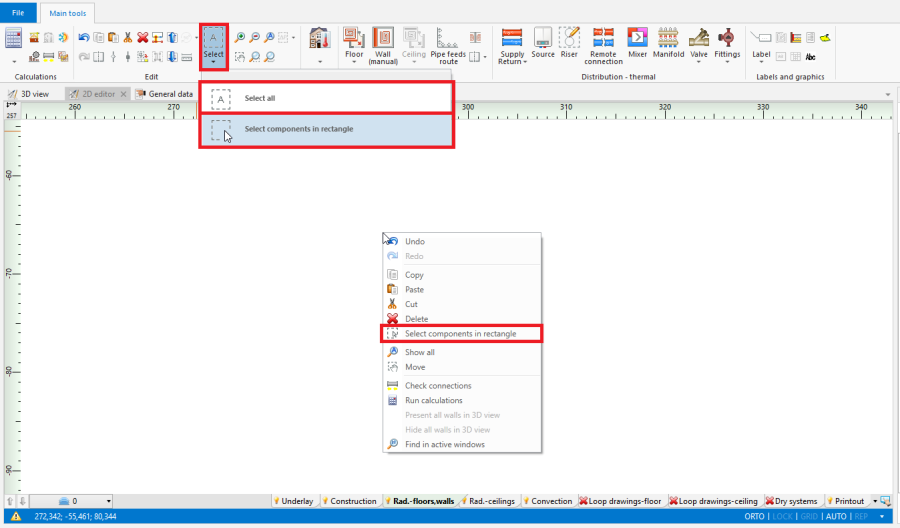
1. Избери елементи в правоъгълник/Избери всичко
- Selecting multiple elements one-by-one
- Проектен браузър window, by selecting suitable Раздел (eg. Сградна конструкция, Отоплителна и охладителна инсталация), from a drop-down list located at the top of the window
- Selecting only elements of defined type, which belong to a given window section
- - Избери в правоъгълник елементи от определен тип button located at the right side of each element type
- - Избери всичко button located at the right side of each element type
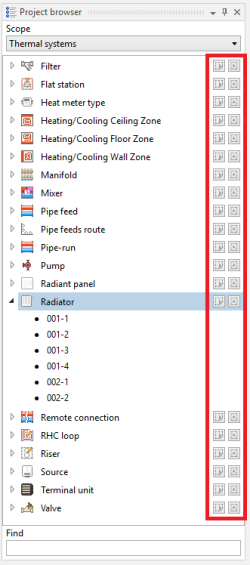
2. Selecting elements of defined type in Проектен браузър window
- Selecting only elements of defined type, which belong to a given window section
- Търси window
- Selecting only elements of defined type, which meet the additional selection criteria (possibilty to define own criteria)
- - Избери в правоъгълник елементи от определен тип button located at the right side of each element type
- - Избери всичко button located at the right side of each element type
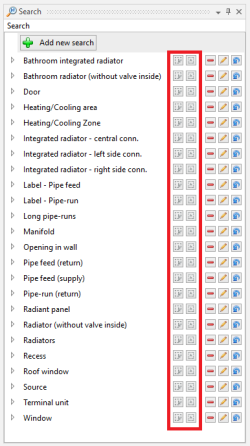
3. Selecting elements meeting additional criteria in "Search" window
- Selecting only elements of defined type, which meet the additional selection criteria (possibilty to define own criteria)
- Диагностики window
- Highlighting all elements, for which a single, grouping diagnostic message was displayed
- - click left mouse button on diagnostic message
- Selecting all elements, for which a single, grouping diagnostic message was displayed
- - double-click left mouse button on diagnostic message
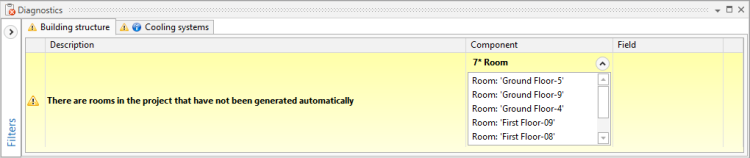
4. Diagnostic message grouping many elements
- - double-click left mouse button on diagnostic message
- Selecting all elements, for which a particular error has occured, in case of repeated diagnostic messages
- - click right mouse button on any of the repeated diagnostic messages and select a Маркирай всички елементи, където има наличие на грешка option from a contex manu
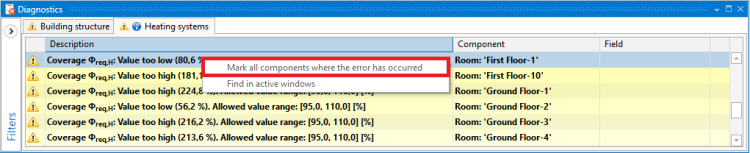
5. Маркирай всички елементи, където има наличие на грешка function for repeated diagnostic messages
- - click right mouse button on any of the repeated diagnostic messages and select a Маркирай всички елементи, където има наличие на грешка option from a contex manu
- Highlighting all elements, for which a single, grouping diagnostic message was displayed


Example of use
Selecting return pipe-runs from a specified area, through a Търси window
Specifying additional selection criteria for pipe-runs and selecting all elements, which meet these criteria
Additional information
- Correction of the selection:
- There is a possibility to deselect individual elements, by holding the Ctrl button and clicking the left mouse button on previously selected element