Изчисляване на проектен топлинен товар на помещения: Разлика между версии
Направо към навигацията
Направо към търсенето
| Ред 119: | Ред 119: | ||
{{Info}} [[Подготовка конструкция на сграда#Computation of building structure|Computation of building structure]] | {{Info}} [[Подготовка конструкция на сграда#Computation of building structure|Computation of building structure]] | ||
=== | ===Проверка на верността на конструкция на сградата=== | ||
# | # Проверете верността на разположенията на етажите и помещенията в рамките на ''<IS_TS id=ScopeKonstrukcjaBudynku/>'' editing scope.<br/>{{Info}} [[Подготовка конструкция на сграда#Verification of the correctness of building structure|Verification of the correctness of building structure]] | ||
# | # Потвърдете графично правилността за създаване на топлинни прегради в рамките на ''<IS_TS id=ScopeOZCShort/>'' editing scope.<br/>Топлинните прегради се създават, подреждат и оразмеряват въз основа на съществуващите в сградната конструкция физически прегради. Идентифицирането на топлинните прегради се извършва по време на ''<IS_TS id=BuildingStructureCalculation/>''.<br/>{{#ev:youtube|Yv7Ci6LsoSs|900||||rel=0}} | ||
# | # Потвърдете графично правилността на създаването на елемента ''<IS_TS id=strl_stridISFPomieszczenieIsMultiStorey/>''.<br/>{{#ev:youtube|o_Qx4piiv0o|900||||rel=0}} | ||
===Data editing=== | ===Data editing=== | ||
Версия от 08:30, 18 ноември 2017
| Продукт | InstalSystem 5 |
| Вид статия | DESIGN APPLICATION |
| Актуално съдържание за версия | BETA REV. 2.0.B4 |
ОБХВАТ НА УРОК
Статията представя процедурата за подготовка на данни за изчисляване на проектния топлинен товар на помещения с използване на стандартни пакети.
МОДУЛИ И ПРОГРАМНА КОНФИГУРАЦИЯ
- InstalSystem 5 пакет с модул:
- Топлинни изчисления на сграда (Топлинни загуби)
Начално състояние
Проектът включва конструкция на сградата (етажи, сгради, помещения, графични прегради), стартов пакет от стандарти и дефиниции на прегради.
За повече информация, моля вижте: Подготовка конструкция на сграда
СТЪПКИ НА ИЗПЪЛНЕНИЕ
| Project files
|
Initial state, isproj Partition definitions, isproj Thermal calculations for multi-storey residential building, isproj |
| Designed with | InstalSystem 5 Rev. BETA REV. 2.0.B4 |
| Required modules | InstalSystem basis Heat loss |
| Project range | Thermal calculations of building |
| Used catalogues |
Climatic data: Poland |
| Type of building | commercial building with basement 2-storey |
| Building structure | |
| Drawings range | Plan view |
| Prepared by |  www.instalsoft.com |
| Legal disclaimer | The whole file or parts of the project may be copied |
| Calculation results | Full printout, xls Full printout, pdf |
| Drawing results |
Данни по подразбиране и настройки на проекта
Опции и стандарти на изчисление

Данни на топлинни загуби
Полетата за данни с червени въпросителни знаци ще бъдат добавени автоматично след първите изчисления, при условие, че са в Авто mode  .
.

Редактиране на данни за конструкция на сградата
- Изрежете отвора в плочата за стълбищна клетка между етажите 1 и 2.
Изчисляване на сградна конструкция
За повече информация, моля вижте: Computation of building structure
Проверка на верността на конструкция на сградата
- Проверете верността на разположенията на етажите и помещенията в рамките на Сградна конструкция editing scope.
За повече информация, моля вижте: Verification of the correctness of building structure - Потвърдете графично правилността за създаване на топлинни прегради в рамките на H&E editing scope.
Топлинните прегради се създават, подреждат и оразмеряват въз основа на съществуващите в сградната конструкция физически прегради. Идентифицирането на топлинните прегради се извършва по време на Изчисление на сградна конструкция. - Потвърдете графично правилността на създаването на елемента .
Data editing
Explanation of terms:
- Graphical partition - structural component of building: wall, slab, roof, window, door, etc..
- Thermal partition - logical component, fragment of physical partition within one room. It is created automatically, is used in calculating and presenting heat losses by heat transmission across a partition within one room.
Дефиници на преграда
- Import Дефиници на преграда from file.
- Create new Дефиници на преграда.
Create new Дефиници на преграда depending on requirements and define them as ПГ с определен U or ПГ с определени слоеве. - Assign Дефиници на преграда to thermal partitions.
Assignment of Дефиници на преграда may be effected:- automatically - upon selecting appropriate option for the partition (name of partition in the list of partitions is highlighted), requires calling Изчисление на сградна конструкция,
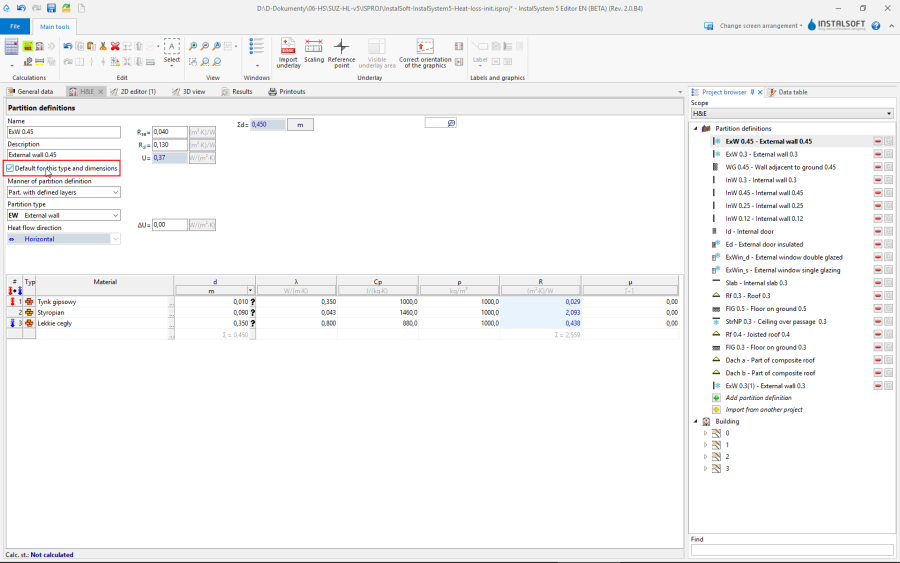
4.
Automatic assignment is succesful only if definition of the partition is accordant with the definition of the thermal partition in terms of:
* thickness of walls, slabs and roofs,
* length and height of windows and doors. - manually.
- automatically - upon selecting appropriate option for the partition (name of partition in the list of partitions is highlighted), requires calling Изчисление на сградна конструкция,

Линеен топлинен мост
- Verify/correct add-ons for the presence of components Линеен топлинен мост depending on the calculation method selected in Общи данни.
Сградна единица/Апартамент
- Correct assignment of rooms to components Сградна единица/Апартамент.
This may be done in the Таблица с данни window of room or using the "drag and drop" function in the building structure tree in the Проектен браузър window.
Помещение
- Correct the Помещение types: bathrooms on both storteys, lounge, kitchen.
- Specify unheated rooms: entrance porch.
- Append Вентилация за топлинна загуба data (V̇ex) for: bathroom and kitchen.
- Specify heated partitions - if the partition is to be integrated with planned surface heating or cooling, then select the Отопляема преграда option for such partition.
- (optional) Add tables of cooling partitions if the actual building structure can be modelled graphically in the program.
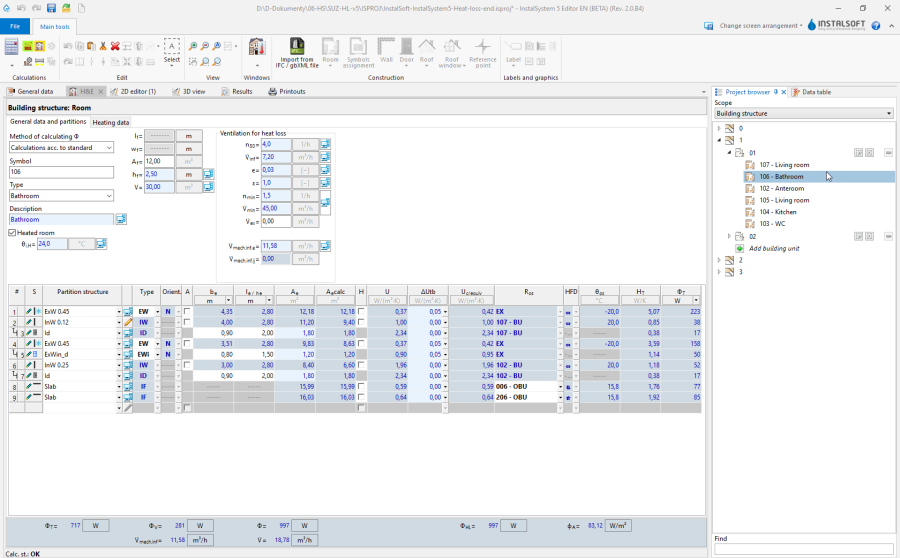
5. Room data editing

Calculations and diagnostics
- Launch calculations by clicking the calculator icon Топлинни изчисления на сграда
 in the Изчисления section of the toolbar.
 - Verify calculation results, paying attention to:
- error messages,
- room calculation results in the H&E window,
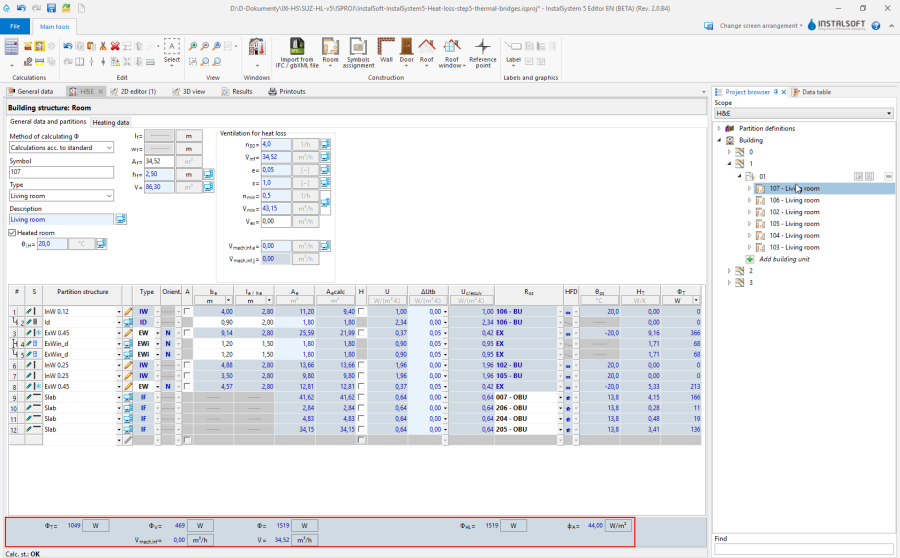
6. Calculation results for rooms - results of heat load Phi in room labels.
- (optional) distribute design heat load of rooms among other rooms.


Prepare drawing for printing/export
За повече информация, моля вижте: Presentation of the calculations result