Внос на файлове
Направо към навигацията
Направо към търсенето
| Продукт | InstalSystem 5 |
| Вид статия | FUNCTIONALITY |
| Актуално съдържание за версия | IS 5.0 Beta 21 |
Description
The article describes the available methods of importing files to the program. The choice of the method depends on the available source data for construction and plans of the individual storeys and on the scope of the design to be developed.
Location in the program
- The function Внеси от gbXML файл is available in the Главни ленти с инструменти toolbar when the editing scope Конструкция is enabled. This function enables importing data on building structure from a gbXML file.
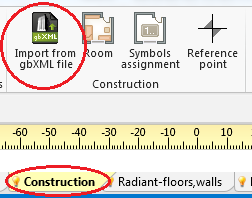
1. Importing gbXML file - The function Внеси подложка is available in the toolbar Главни ленти с инструменти when the editing scope Основа is enabled. This function enables loading base drawing files in a raster (bmp, png, jpg), pdf or dwg format.
In the Таблица с данни of the component the base drawing can be refreshed and its scale can be edited.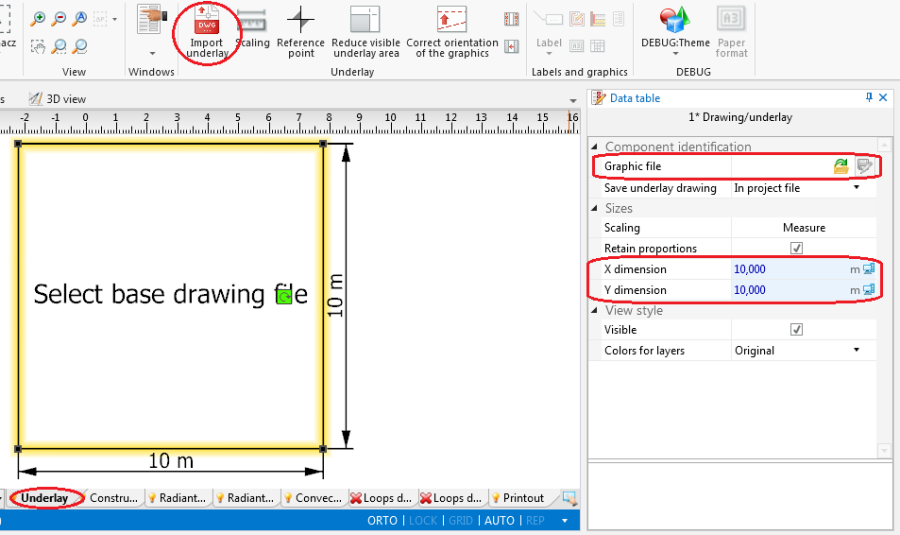
2. Importing base drawing


Example of use
Importing complete structure of building
- Select Внеси от gbXML файл.
- Select the file to be imported.
Importing base drawing
- Select Внеси подложка.
- Select the image to be imported.
- Indicate the position of the imported image in the editing area.
- Verify the correctness of scale units of the inserted base drawing.
Additional information
- It is particularly advantageous to import a base drawing in the DWG format, as it enables snapping the cursor to components located on indicated layers of the base drawing when editing the structure.
- It is worth noting that printed plan drawings can be scanned or photographed, and the file thus obtained can be imported.
- After importing the file and rescaling all storeys, mutual alignment of the drawings must be verified. To adjust the position the Относителна точка
 component can be used.
