Търсене на елементи в проекта
| Продукт | InstalSystem 5 |
| Вид статия | FUNCTION AND TOOL |
| Актуално съдържание за версия | IS 5.0 Beta 22 |
Описание
Инструментът позволява търсене на елемент или група елементи в рамките на проекта. В резултат намерените елементи са маркирани във всички активни прозорци, като например: 2D редактор, 3D изглед, Таблица с данни, Резултати, etc.
Location in the program
- The function forms a separate window and is available in the Главни ленти с инструменти toolbar in the Прозорци section.
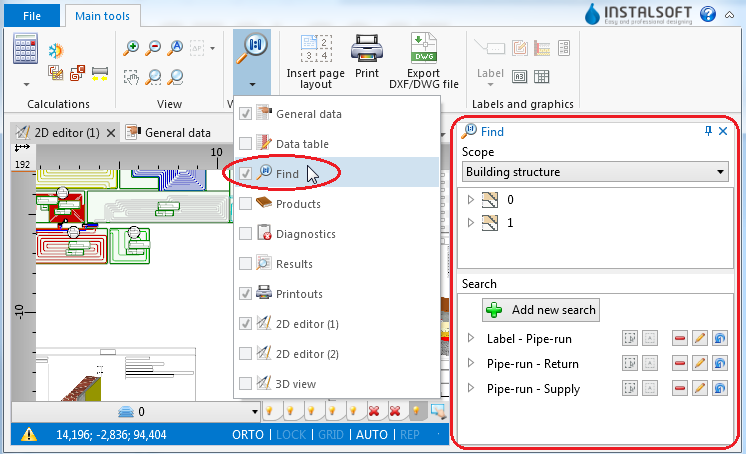
1. function

Example of use
Searching for components of selected type
- Select Раздел of search (e.g. Сградна конструкция, Отоплителна и охладителна инсталация).
- Select the component in the tree of components.
- Additional buttons on the right side of window enable:
- searching for components of selected type within a drawing indicated by the user,
- searching for all components of selected type.
Searching for components that meet defined criteria
- Select one of the previously defined searches
or - Select Добави ново търсене.
- Fill in the Търси по име field.
- Select the scope of search in the Намери field.
- Select from the list the data type to be used in the search.
- Narrow down the range of your search by specifying the values of selected data.